
SocialTech VPN
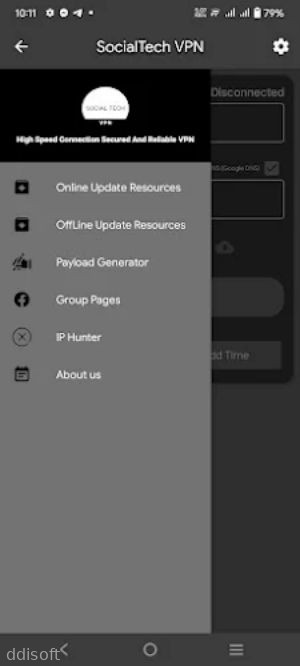

SocialTech VPN App Introduction
SocialTech VPN is designed for Android users who want quick, no-fuss privacy while they browse, chat, or stream. Instead of drowning you in complicated settings, it focuses on one thing: making secure connections feel as easy as tapping a button.
If you are tired of random blocks on social apps or region-locked websites, this app steps in as a simple workaround. You connect once, then carry on with your usual scrolling, messaging, or browsing while the VPN quietly runs in the background.
It aims to keep your data safer on public Wi‑Fi, hide your IP address from basic tracking, and give you a more stable way to access online services that might not always be available in your area.
SocialTech VPN App Features
1. One-tap connection: Start a secure VPN session with a single tap, without digging through advanced menus.
2. Server switching: Move between available servers to look for better speed or access to different regions.
3. Background protection: Keep the VPN active while you use social apps, browsers, or streaming tools.
4. Data privacy focus: Hide your IP address from basic tracking and reduce exposure on public Wi‑Fi networks.
5. Lightweight design: Run the app on most Android phones without heavy battery or storage usage.
SocialTech VPN App Highlights
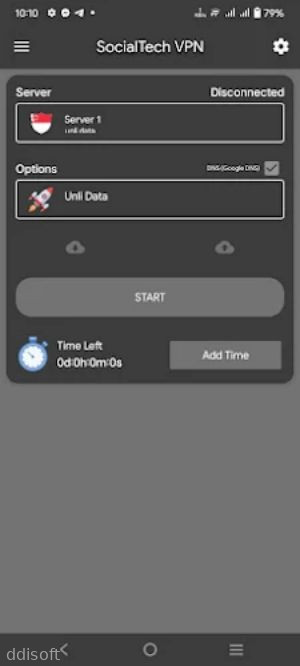
🔥 Simple dashboard - A clean home screen shows your connection status, server choice, and a clear connect button.
🔒 Secure tunnel - Routes your traffic through encrypted channels so casual snooping on shared networks becomes harder.
🚀 Social boost - Helps keep access to social networks and messaging platforms when they feel restricted or unstable.
📱 Mobile-friendly - Built with mobile data in mind so you can stay connected on 4G or 5G without constant tweaking.
💡 Quick feedback - Connection states update fast, letting you know right away if you are protected or offline.
SocialTech VPN App Usage
Launch the app and check the main screen so you can see whether you are currently connected or not.
Tap the connect button to start a secure session and wait for the status to confirm that the VPN is active.
Switch servers when speeds feel slow by choosing a different location from the server list and reconnecting.
Open your social apps, browser, or streaming services after the VPN connects to keep your activity routed through the tunnel.
Disconnect from the VPN when you no longer need the extra layer of privacy or want to return to your normal connection.
SocialTech VPN App Conclusion
SocialTech VPN leans into a straightforward approach: quick setup, one-tap connection, and a layout that makes sense even if you are new to VPNs. It is aimed at users who mainly want safer browsing and more stable access to social platforms without learning complex networking terms.
If you often use public Wi‑Fi, feel limited by regional blocks, or just want your Android traffic to feel a bit more private, SocialTech VPN offers a lightweight way to add that extra layer. It is not trying to be the most advanced security suite on the planet, but rather a practical everyday tool you can turn on and forget while you get back to your usual online routine.
FAQs
Is SocialTech VPN free to use on Android?
SocialTech VPN is typically offered as a free download with core features available at no cost. Some versions may include optional upgrades or limits, depending on how the developer set up the app.
Does SocialTech VPN work with social media and messaging apps?
Yes, SocialTech VPN is mainly built to keep social media and messaging apps accessible and more private. Once connected, you can open your usual apps and your traffic will go through the VPN tunnel.
Will SocialTech VPN slow down my internet connection?
Any VPN can change your speed because traffic is routed through a remote server. With SocialTech VPN, you can switch servers to look for better performance if your current connection feels slow.
App Information
You May Also Like
![MILF Conditioning [Andoidesion] icon](https://image.ddisoft.com/storage/20260330/6887886018bef39cf9f4985b19e8de8d.png)
MILF Conditioning [Andoidesion]

My Life As A Molester And My Girlfriend

Chavo

Hikiimo – I want to flirt with my reclusive, cheeky step-sister

Breaking My Step-Mother – The Prologue!

Play with Sara-chan! Lovey-Dovey Sex with a Classmate

PrimeTime Hentai

Appehend;Gilfiend

FutaParadise
Guard VPN - Fast & Proxy VPN
Comments
No comments yet. Be the first to share your thoughts!
